
EZGO TXT Won't Move? Find the Fault on Series, DCS, PDS and TXT 48
An E-Z-GO TXT that won't move is usually Run/Tow, the charger interlock or a weak pack. If not, PDS carts beep out fault codes and every TXT can be tested pin by pin at the controller. Here's how for each drive system.
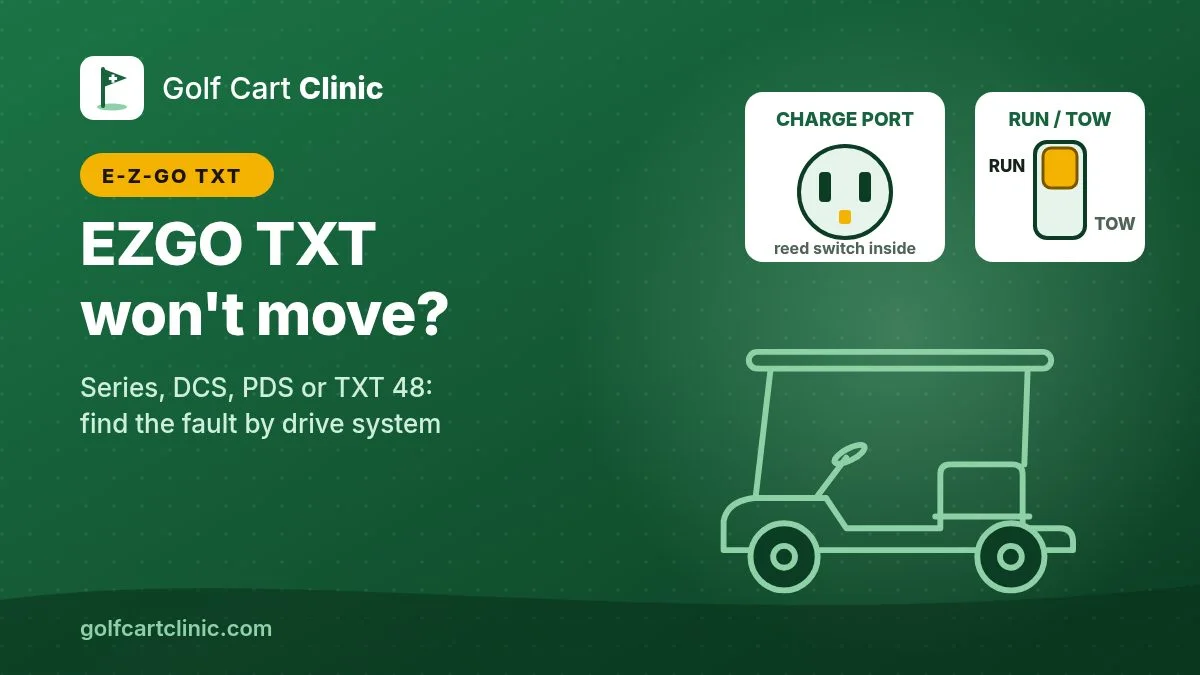
Quick answer: on an electric E-Z-GO TXT, first rule out the four things that disable the controller on purpose: the Run/Tow switch under the passenger seat (set it to Run and wait 30 seconds after any wiring work), the charger cord, the Forward/Reverse selector and the pedal being pressed when you turn the key. Then check the charge-port reed switch, a known weak spot on TXTs. After that, the test depends on which TXT you have: a 36V PDS beeps out fault codes through the reverse buzzer, a 2010-on TXT 48 needs a handheld tool or a meter at the controller plug.
Safety first. A TXT pack is 36V or 48V and can deliver hundreds of amps through a wrench, ring or watch. Wear safety glasses, use insulated tools and take off jewelry. For every test that involves pressing the pedal, chock the front wheels and lift the rear (drive) wheels securely on jack stands; the controller rebuilder FSIP's TXT sheets say to always do this when troubleshooting. E-Z-GO says to put Run/Tow in Tow/Maintenance before connecting or disconnecting batteries or any wiring. Never jump the solenoid's two large posts. If a cable has melted, a battery is swollen or hot, or you smell burning, stop.
First: which TXT do you have?
"TXT" is a body style that E-Z-GO built around four different electric drive systems, and each one is diagnosed differently. You can tell them apart in a minute without knowing the year. These identification points come from Revolution Golf Cars' drive system identification guide, an explainer in Golf Car News and an Alltrax product bulletin on the TXT 48. Year ranges are approximate; sources differ by a year or so.
| System | How to spot it | Pack | How it reports faults |
|---|---|---|---|
| Series (non-DCS, mid-1990s on) | Forward/Reverse lever with a linkage rod down to a switch bolted in the battery compartment. No Run/Tow switch, no speed sensor on the motor. | 36V | No codes; meter tests only |
| DCS (about 1995–1999) | Same-looking F/R lever, but no linkage rod (a small rotating disc instead). Run/Tow switch under the seat. No speed sensor. | 36V | No beep codes; meter tests |
| PDS (about 2000–2010) | Rocker F/R switch on the dash next to the key. Run/Tow switch under the seat. Speed sensor on the motor. Controller has several plugs. | 36V, six 6V batteries | Beep codes through the reverse buzzer |
| TXT 48 (2010 model year on) | Dash rocker F/R, Run/Tow switch, speed sensor, black Curtis controller with a single 16-pin plug. | 48V, six 8V batteries | Handheld diagnostic tool; meter tests |
TXTs running lithium batteries (factory or conversion) have a battery management system that can shut the pack off on its own. If your pack reads 0V, read the lithium notes in our golf cart won't move guide and your battery's manual before anything else. If you want the build year, our serial number lookup explains how to read the serial plate.
Five TXT checks before you pick up a meter
- Run/Tow switch on Run, then wait. On DCS, PDS and TXT 48 carts, the switch is under the seat (passenger side on PDS and later carts, on or near the controller cover). E-Z-GO's TXT Freedom owner's guide says Tow/Maintenance deactivates the controller, the electronic braking and the warning beeper. It also says that after connecting a battery or any other wiring, you should wait at least 30 seconds before moving the switch to Run. If the cart died right after battery work, this is the first suspect.
- Charger cord fully out. E-Z-GO's guides say the charging interlock disables the controller while the charger plug is in the receptacle. Pull it out and make sure nothing is stuck in the port.
- Selector firmly in Forward or Reverse. Put it in Reverse: on PDS and TXT 48 carts, the reverse buzzer should sound. If it does, the key and selector circuit are alive. E-Z-GO also warns that moving the selector while rolling causes sudden slowing and the warning beeper.
- Pedal up when you turn the key. E-Z-GO's high pedal disable blocks the drive if the key is turned on or the direction is changed while the pedal is pressed. Let the pedal all the way up, cycle the key and try again. On a TXT 48, E-Z-GO's handheld guide lists this fault as clearing once the throttle drops below 25%.
- Pack voltage. With a DC voltmeter across the pack's main positive and negative, a rested flooded lead-acid 36V pack reads about 38.2V full and 36.3V at half charge; a 48V pack reads about 50.9V full and 48.4V at half (Trojan's open-circuit voltage chart). If it's lower, charge first. On a 48V TXT Freedom, E-Z-GO's charger won't start on a pack below 48.0V and flashes red twice instead. That's a battery problem, not a drive problem.
The TXT weak spot: the reed switch in the charge port
The charger interlock on a TXT is a small reed switch inside the charging receptacle. With no cord plugged in, it should pass pack voltage to the controller's interlock input. When it fails open, the controller acts as if a charger is connected and the cart won't drive. FSIP's PDS troubleshooting sheet calls a damaged reed switch a "common failure", and its DCS sheet says a broken reed switch in the charge receptacle is common.
How to check it with the cord unplugged, key off, Run/Tow on Run, meter black lead on the main battery negative:
- TXT 48 (Curtis 1206HB): back-probe pin 5 of the 16-pin controller plug. It must read pack voltage. If it doesn't, check the wiring and the reed switch in the receptacle.
- PDS (Curtis 1206MX): J1 pin 4 must read pack voltage with the charger disconnected.
- DCS (Curtis 1206SX): pin 9 must read pack voltage with Run/Tow on Run. If it doesn't, check the wiring, the Run/Tow switch and the reed switch.
- Series (non-DCS): the reed switch sits in the same start circuit as the key, the direction switch and the pedal switch. See the series section below.
A failed reed switch is fixed by replacing the receptacle or switch. Don't leave the interlock jumpered: it is what stops the cart from being driven off with the cord still attached.
The diagnosis at a glance
- If Run/Tow is on Tow, the cord is in, the selector is between positions or the pedal was down at key-on → fix it, cycle the key, wait 30 seconds after any wiring work.
- If the pack is under the half-charge voltage → charge it first, then test each battery under load.
- If it's a PDS → put it in diagnostic mode and count the beeps (table below).
- If it's a TXT 48 → read faults with a handheld tool, or go input by input with a meter at the controller plug.
- If every input reads right and the solenoid clicks but the cart sits → test the solenoid contacts, the power cables and the motor windings.
PDS (36V): let the cart tell you the fault
A PDS cart can beep out its fault codes through the reverse buzzer, so the buzzer has to work (put the cart in Reverse to check it). E-Z-GO's 2001-on owner's manual gives this procedure:
- Turn the key switch Off.
- Put the Run/Tow/Maintenance switch on Run.
- Move the direction selector from Neutral to Reverse five times.
- Listen. A first group of beeps confirms diagnostic mode; the manual says the number of beeps matches the cart's performance option. After that, a code sounds when a fault is detected.
- To leave diagnostic mode, select Tow/Maintenance.
The manual splits the codes into two groups. For the first group, raise the rear wheels before testing:
| Beeps | Fault | What the cart does | E-Z-GO's correction |
|---|---|---|---|
| 1-1 | Controller failure | Won't run | Check motor wiring and motor resistance; replace controller |
| 1-2 | Throttle fault | Solenoid clicks, won't run | Replace or adjust pedal box, harness |
| 1-4 | High pedal disable | Won't run | Release pedal; check pedal box, linkage and switch |
| 2-4 | Solenoid coil failure or disconnected | Won't run | Check coil connections and wiring; replace solenoid if needed |
| 3-1 | Solenoid driver fail | Won't run | Check coil wiring for shorts; replace controller |
| 3-3 | Solenoid did not close | Won't run | Check all solenoid wiring; replace solenoid if needed |
| 3-4 | Field winding open | Solenoid clicks, won't run | Check motor and controller field connections; power harness or motor |
| 4-1 | Armature open | Solenoid clicks, won't run | Check motor and controller armature connections; power harness or motor |
| 4-3 | Solenoid drop out | Stops | Check solenoid and wiring |
The second group only shows up while the cart is driven under load:
| Beeps | Fault | What the cart does | E-Z-GO's correction |
|---|---|---|---|
| 1-3 | Speed sensor fault | Runs slowly | Check sensor connections and magnet; replace sensor if needed |
| 2-1 | Low battery voltage | Reduced performance | Charge batteries; replace bad ones |
| 2-2 | High battery voltage | Reduced regenerative braking | Check battery voltage |
| 2-3 | Thermal cutback | Reduced performance | Let the controller cool; check heat sink bolt torque |
| 3-2 | Solenoid welded | Runs slowly | Check auxiliary power; replace solenoid |
| 4-2 | Motor stalled | Stopped | Remove the mechanical blockage |
TXT 48 (2010 on): no beep codes, so use a handheld or a meter
E-Z-GO's TXT 48V service manual says diagnostic mode on these carts is by handheld only. The tool plugs into a diagnostic port under the passenger seat, and it won't work with Run/Tow on Tow or with the charger connected. E-Z-GO's handheld guide lists the controller faults; these are the ones behind a cart that won't move or only crawls:
| Handheld shows | Meaning | Likely cause (per E-Z-GO) |
|---|---|---|
| HPD | High pedal disable | Pedal pressed before key and direction, or a bad throttle device |
| THROTTLE FAULT | Throttle input fault | Throttle wiring open or shorted, or a bad throttle device |
| MAIN COIL OPEN | Solenoid coil seen as open | Solenoid coil or its wiring open |
| MAIN DROPOUT 1 | Solenoid opened while driving | Solenoid, or its coil or wiring |
| FIELD MISSING | Motor field winding open | Field winding or its connection |
| HW FAILSAFE | Hardware failsafe error | Defective controller or miswired power cables |
| MOTOR STALL | High current with no speed pulses | Stalled motor, or a bad speed sensor or wiring |
| SPEED SENSOR FAULT | No speed pulses | Bad or missing speed sensor, open wiring; cart limps in slow speed |
| MAIN WELDED | Solenoid stuck closed | Welded solenoid contacts; cart limps in slow speed |
| LOW BATTERY VOLTAGE | Pack below the cutback limit | Low pack, corroded battery terminal, loose battery or controller terminal |
| THERMAL CUTBACK | Controller over or under temperature | Above 85°C or below −25°C, heavy load, poor mounting |
No handheld? A meter does the same job, one input at a time.
Meter tests at the controller plug, by system
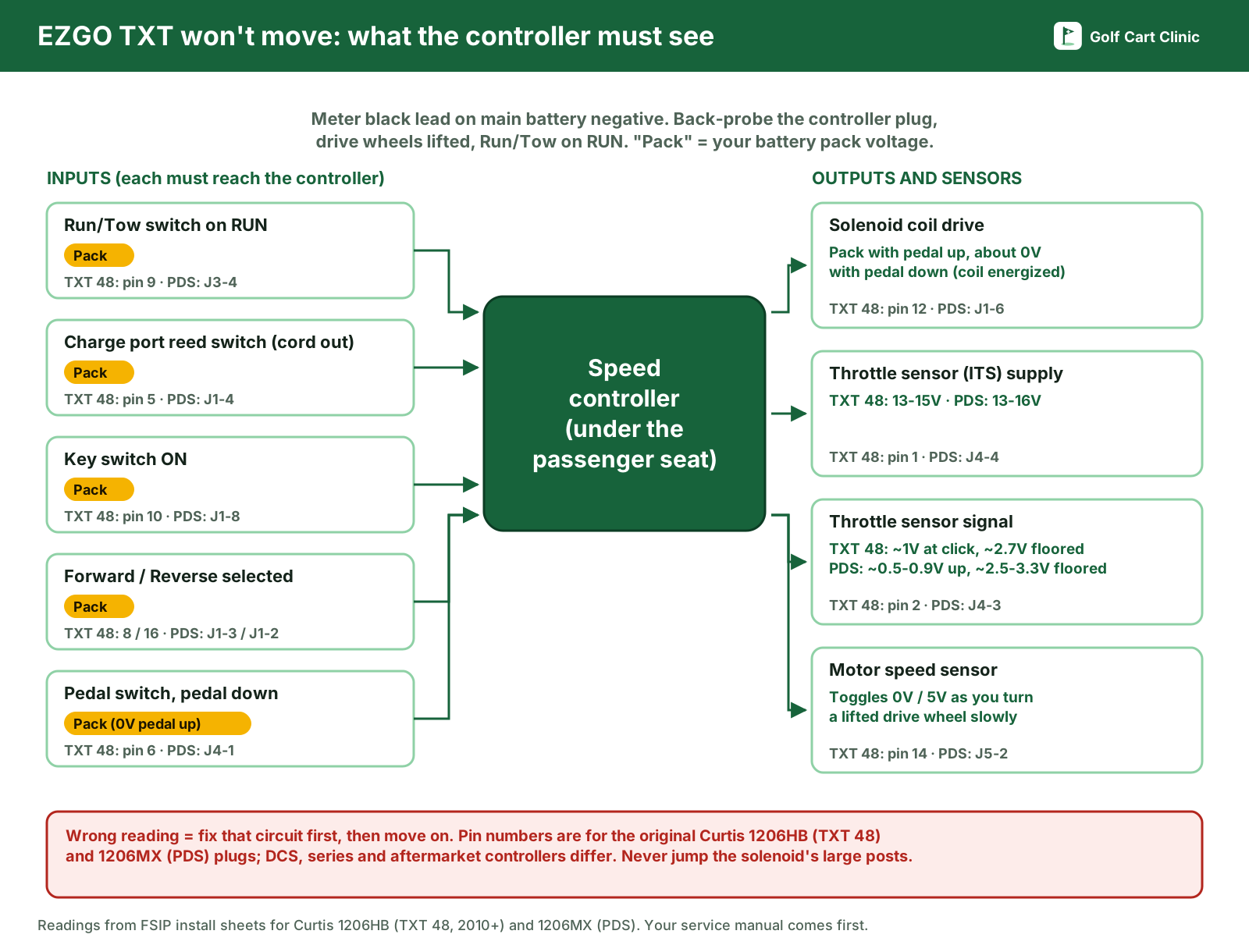
All of these come from FSIP's install and troubleshooting sheets for the original Curtis controllers. Leave the plug connected and back-probe from the wire side (a straightened paperclip works). Black lead on the main battery negative, rear wheels off the ground, Run/Tow on Run. First measure the main positive post: that's your "pack voltage." E-Z-GO's service manual notes that readings through wires and connectors can be up to about one volt below it. Work in order and fix the first wrong reading before you go on.
TXT 48 (Curtis 1206HB, 16-pin plug)
| Pin | Condition | Should read | If not |
|---|---|---|---|
| 5 | Charger unplugged | Pack voltage | Reed switch in charge port, wiring |
| 9 | Run/Tow on Run | Pack voltage | Run/Tow switch, wiring |
| 8 | Selector in Forward | Pack voltage | F/R switch, wiring |
| 16 | Selector in Reverse | Pack voltage, buzzer sounds | F/R switch, wiring |
| 7 | Selector in Reverse | 0V, buzzer sounds | Reverse buzzer or wiring open |
| 10 | Key on | Pack voltage | Key switch open |
| 6 | Pedal up / pedal down | 0V / pack voltage | Pedal switch shorted / open |
| 12 | Pedal up / pedal down | Pack voltage / about 0V | Solenoid coil or wiring open |
| 1 | Run/Tow on Run | 13–15V | Unplug the throttle sensor (ITS): if it comes back, replace the ITS |
| 2 | Pedal at the solenoid click / floored | 1V ±0.3V / 2.7V ±0.5V | Test the ITS |
| 15, 13 | Run/Tow on Run | 15V / about 0V | Speed sensor or wiring |
| 14 | Turn a lifted drive wheel slowly | Toggles 0V and 5V | Speed sensor or wiring |
PDS (Curtis 1206MX, several plugs)
| Pin | Condition | Should read | If not |
|---|---|---|---|
| J1-5 | Run/Tow on Run | Within 4V of pack | Precharge resistor missing or bad |
| J3-2, J3-4 | Run/Tow on Run | Same as J1-5 / pack voltage | Run/Tow switch or wiring |
| J1-4 | Charger unplugged | Pack voltage | Reed switch in charge port |
| J1-3 | Neutral / Forward | About 0V / pack voltage | F/R switch shorted / open |
| J1-2 | Neutral / Reverse | About 0V / pack voltage | F/R switch shorted / open |
| J1-8 | Key off / key on | About 0V / pack voltage | Key switch shorted / open |
| J4-1 | Pedal up / floored | About 0V / pack voltage | Pedal switch shorted / open |
| J4-4 | Run/Tow on Run | 13–16V | Unplug the ITS: if it comes back, replace the ITS |
| J4-3 | Pedal up / floored | About 0.5–0.9V / 2.5–3.3V | Wiring, then the ITS |
| J1-6 | Pedal up / pedal down | Pack voltage / 0V and solenoid engages | Solenoid, wiring, then controller |
| J5-3, J5-2 | Run/Tow on Run / turn a lifted wheel | 12–15V / toggles 0–5V | Speed sensor, its magnet, wiring |
DCS (Curtis 1206SX)
- Pins 10 and 9 must read pack voltage with Run/Tow on Run. Pin 9 also runs through the charger interlock.
- Pin 6: pack voltage with the key on and Forward or Reverse selected. If not, check the F/R switch and the key switch.
- Pin 4: 0V in Forward, pack voltage in Reverse. A wrong reading points to the MS2 microswitch on the direction switch.
- Pin 5: pack voltage with the pedal down. If the solenoid doesn't click then, check pin 7: it should read pack voltage with the key on, the pedal up and a direction selected. If it doesn't, suspect an open solenoid coil.
- Pin 2: 14–15V (throttle sensor supply). Pin 1: about 0.4V with the pedal up and about 1.5V with the pedal floored.
- FSIP's tip: if the cart has no walk-away braking, or only drives after a delay of about 10 seconds, replace the diode/resistor module at the solenoid.
Series TXT (lever with linkage rod, Curtis 1206-03/-04)
This cart has no Run/Tow switch and no codes. Everything that grants permission to drive feeds one wire. Key on, Forward selected, pedal down: pin 4 must read pack voltage and the solenoid must click. If it doesn't, FSIP lists the charger reed switch, the MS2 microswitch in the direction switch, the key switch, the pedal microswitch (MS3) and the wiring between them. With the pack disconnected, check each one for continuity in its "on" position to find the open one. Pin 4 at pack voltage but no click? Check for pack voltage across the solenoid's small terminals, then the coil. Throttle sensor: about 12–16V on pin 2, and on pin 1 about 0.6V at the click and 1.6V floored (±0.2V).
Solenoid clicks, cart still won't move
A click only proves the coil moved; the heavy contacts may still not be passing current. Our solenoid clicking guide covers the on-cart voltage test. To bench-check a TXT solenoid, FSIP's sheets say:
- With all wires off, the coil (small terminals) should measure at least 100 Ω. FSIP's series-TXT sheet gives 100–250 Ω depending on the solenoid type.
- Put the meter on the two large posts and feed pack voltage to the coil with jumpers. The reading must drop from open to less than 0.3 Ω. E-Z-GO's manual adds that continuity across the large posts with the coil off means the contacts are welded.
- Many TXT solenoids have a suppression diode on the coil. If you replace the solenoid, put the diode back the right way round; the band orientation is on FSIP's sheet for your controller, and in our solenoid diode and resistor guide.
If the solenoid passes, check the motor with the motor wires disconnected. For PDS and TXT 48 motors, FSIP gives armature A1–A2 at 0.3–1 Ω and field F1–F2 at 1–2 Ω; for DCS, 0.2–1 Ω for the armature. A1 to F1 must be open, and F1 to the motor case must be over 5 MΩ. Touch the meter leads together first and subtract that reading, because these values are tiny. FSIP notes that many cart problems turn out to be burnt or damaged brushes, which the armature check catches, and that a shorted armature and field will damage a new controller.
If it stopped right after new batteries
- Did the cart sit in Tow for at least 30 seconds after the last cable went on? If not, go back to Tow, wait, then Run.
- Compare the cable layout with the battery diagram in your owner's manual. One reversed battery drops pack voltage by twice that battery's voltage.
- E-Z-GO's TXT Freedom guide gives 90–100 in-lb for battery post hardware. A loose post can read fine at rest and collapse under load.
- A steady spark when you connect the last cable means a short somewhere. Stop and read what to do when a golf cart sparks when connecting the battery.
- Flooded batteries need correct electrolyte levels to hold voltage under load; see how to water golf cart batteries.
When to call a technician
- A beep code or handheld fault whose correction is "replace controller", and your motor and wiring checks passed.
- Melted cables, a burnt controller plug pin or a hot, swollen battery.
- The motor turns with the pedal up, or the cart creeps in Neutral.
- Low-ohm readings you can't trust on your meter.
More brand guides are in our E-Z-GO section, and symptom guides for every brand are in troubleshooting.
Frequently asked questions
Why won't my EZGO TXT move after charging?
Either the charger plug is still in the receptacle, or the reed switch in the charge port has failed and the controller still thinks a charger is connected. With the cord out, the interlock input should read pack voltage: pin 5 on a TXT 48 controller, J1 pin 4 on a PDS.
How do I put an EZGO PDS in diagnostic mode?
Key off, Run/Tow on Run, then move the direction selector from Neutral to Reverse five times. After the confirming beeps, the reverse buzzer sounds a code when it detects a fault. Select Tow/Maintenance to exit. The reverse buzzer must work for this.
Does a TXT 48 beep fault codes?
No. E-Z-GO's TXT 48V service manual says diagnostic mode on these carts is by handheld only, through the diagnostic port under the passenger seat. Without the tool, test each controller input with a meter.
Why does my EZGO TXT only go walking speed?
The controller has usually dropped into a slow "limp" mode to protect itself. On a PDS, code 1-3 (speed sensor) and 3-2 (welded solenoid) both list "runs slowly." On a TXT 48, a speed sensor fault or welded solenoid triggers the same limp-home speed. Check the speed sensor, its magnet and wiring, and the solenoid contacts.
Where is the Run/Tow switch on an EZGO TXT?
Under the seat, on or near the controller cover; E-Z-GO's PDS and TXT Freedom manuals put it on the passenger side. Series TXTs with a linkage-type lever don't have one.
Can I bypass the charger interlock to get the cart moving?
Only as a short test to confirm the diagnosis, and then replace the receptacle or reed switch. The interlock is there so the cart can't be driven off with the charger cord connected.
Sources
- E-Z-GO, TXT Freedom 48V owner's guide 633138-F (Run - Tow/Maintenance switch, 30-second wait, charger interlock and charger fault codes, high pedal disable, diagnostic mode, 90–100 in-lb battery hardware): ezgo.txtsv.com (PDF)
- E-Z-GO, electric fleet golf car and personal vehicle owner's manual, model year 2001 on, 28645-G01 (PDS diagnostic mode and beep code chart): PDF hosted by My Golf Buggy
- E-Z-GO, TXT 48V repair and service manual 614279 (handheld-only diagnostics, battery reference voltage, solenoid continuity, 1206HB-5201 fault table): ManualsLib
- E-Z-GO, TXT 48V handheld diagnostics and troubleshooting guide 614450 (fault list, controller responses, tool limits): PDF hosted by GolfTechs
- FSIP (Flight Systems Industrial Products), install and troubleshooting sheets for E-Z-GO controllers: TXT 48, Curtis 1206HB, PDS, Curtis 1206MX, DCS, Curtis 1206SX, series TXT, Curtis 1206-03/-04
- Revolution Golf Cars, drive system identification: revolutiongolfcars.com
- Golf Car News, "Understanding PDS, DCS and IQ systems" (2016): golfcarnews.com
- Alltrax, product bulletin on the EZGO TXT 48 (2010 model year, 16-pin connector, controller ID): alltraxinc.com (PDF)
- Trojan Battery, open-circuit voltage chart: trojanbattery.com
- Your cart's own owner's and service manual. Where it differs from this guide, follow it.
Last checked against the documents above on October 24, 2026. E-Z-GO and TXT are trademarks of their owner; Golf Cart Clinic is independent and not affiliated with E-Z-GO.
Questions and comments
No comments yet. Corrections and notes from your own repair are welcome.