
Lithium Golf Cart Battery Sleep Mode and Low-Charge Shutdown, by Brand
A lithium golf cart that reads 0V or only turns on while the charger is plugged in is often asleep or in low-charge protection, not dead. Here is what each major brand publishes about its sleep timer, limp mode, shutdown point and wake-up steps, with links to the makers' own documents.
Quick answer: a lithium golf cart battery that suddenly reads 0V, shows a blank meter, or only powers the cart while the charger is plugged in is very often asleep or sitting in low-charge protection, not dead. Most makers program the battery management system (BMS) to switch the pack off after it sits unused, and to cut power when the charge gets too low. The fix is usually the maker's wake-up step (a power button, a remote wake button, or their own charger), followed by a full charge. The table below lists what each brand actually publishes, with a link to the maker's own document for every number. Where a maker doesn't say, the table says "not published".
Safety first: don't open the pack, and don't bypass the BMS. A 48V golf cart lithium battery can push hundreds of amps into a short. Never remove the cover, jump the cells, clamp another battery across it, or wire around the BMS to "wake" it. The BMS is the only thing protecting those cells, and a cell that has been run too low can be damaged in ways you can't see. It also costs you the warranty: Denago says non-factory additions directly to the battery void its warranty, Evolution says a pack under 40V or a cell under 2.5V has permanent damage that invalidates the warranty, Allied says over-discharge isn't covered, and Eco Battery says using a charger it hasn't approved voids the battery warranty. Use the wake-up steps in your manual and the charger the maker supplies or approves. If the battery is hot, swollen, smells burnt or hisses, stop, move away from it and call the maker.
Time estimate: trying the wake-up step for your brand takes 5 minutes. Confirming it actually took a charge (charger cycles, the percentage climbs, the cart stays on after you unplug) takes 15 to 30 minutes. A full recovery charge after a deep discharge is overnight wall-clock time.
What you need
- Your battery's manual, or its app if it has one (many apps show the lowest cell voltage, which tells you more than the pack voltage does).
- The charger that came with the battery, or one the battery maker approves. Several brands wake the BMS through the charger, and a generic or lead-acid charger may not do it.
- The battery's model number from its label, because timers and cutoffs differ between models and generations of the same brand.
- Optional: a digital multimeter for DC volts at the main terminals.
What not to do
- Don't open the case or "jump" the cells inside. Makers say it plainly: Bolt says don't attempt to open the battery, RoyPow says don't disassemble, reassemble or repair it, and Evolution and E-Z-GO say don't disassemble or modify the pack. Signs of opening are also a common reason makers refuse a warranty claim.
- Don't clamp a second battery or another cart across a sleeping pack. It forces current around the protection with nothing to limit it.
- Don't use a lead-acid charger to "kick" a lithium battery. Vatrer says to stop immediately if your charger is designed for lead-acid, because the wrong charging curve can damage lithium batteries.
- Don't keep driving after the low-battery alarm. RoyPow warns that driving on after the meter alarm will make the cart suddenly stop, and Denago's cart shuts down at 10%.
- Don't store the cart with the battery on and the charge low. A sleeping battery is still slowly self-discharging, and a pack left near empty can drop below the point where its maker allows charging.
Sleep mode, limp mode and shutdown: what's the difference?
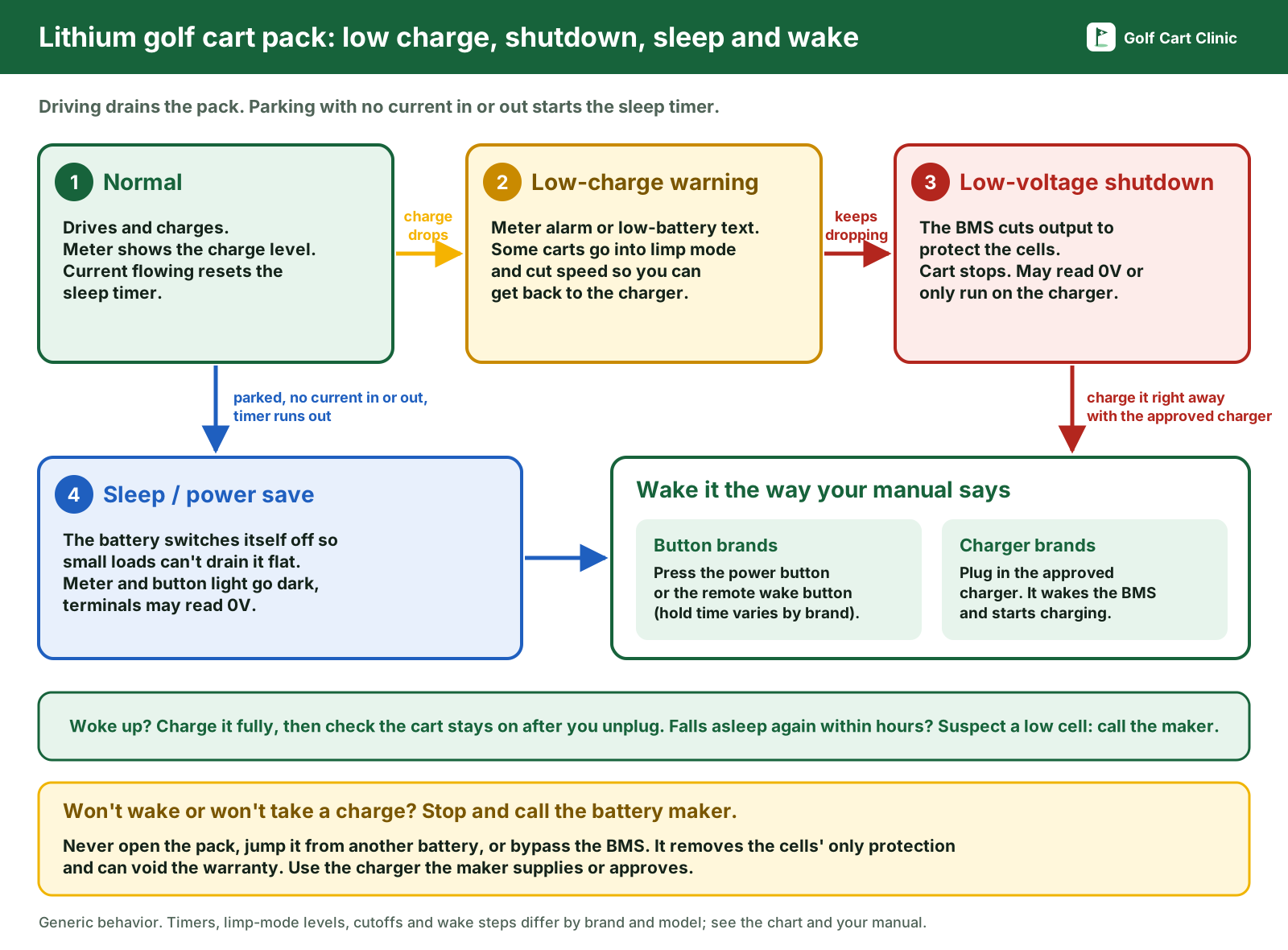
These three get mixed up, and they look the same from the driver's seat, so it helps to separate them:
- Sleep (or "Power Save") mode is a timer. When no current goes in or out for a set time, the BMS switches the battery off so small loads (the meter, a radio, a 12V converter, a key left on) can't drain it flat. The battery is usually fine. Allied, for example, says its timer starts as soon as there's no charge or discharge current and resets whenever there is.
- Limp mode is a warning on the road. When the charge gets low, some carts cut speed so you can still get home. Denago is the only maker here that publishes the exact steps: half speed at 20%, a second stage at 15%. ICON advertises a limp mode too but doesn't publish the percentage.
- Low-voltage shutdown is the hard stop. When the pack or its lowest cell gets too low, the BMS (or on some carts, the controller) cuts output to protect the cells. Several makers list the pack cutoff as a "discharge cut-off" or "low voltage disconnect" voltage on the spec sheet.
The practical difference: a battery that went to sleep with plenty of charge wakes right up and drives normally. A battery that shut down because it was empty will wake, but then needs to go straight on the charger, and if it sat empty for a long time it may not accept a charge at all.
Sleep mode and low-charge shutdown by brand
All values below come from the battery or cart maker's own pages, manuals or support documents. "Not published" means we couldn't find the value in the maker's own material; it doesn't mean the feature doesn't exist. Specs change between models and firmware, so check the document for your exact battery.
| Brand (document) | Low-charge limp mode | Auto shutdown point | Sleep / standby timer | How to wake it | BMS low cell threshold | Source |
|---|---|---|---|---|---|---|
| Allied Lithium (commercial batteries) | Not published | Not published (Allied says keep the charge above 20%) | About 7 days when all cells are at or above 3.30V; reduced to a couple of hours when the lowest cell is below 3.30V | Press the power button to off, wait a couple of seconds, press it on again (push it all the way in), or reconnect the charger for a few seconds (if it was already connected, disconnect it about 30 seconds first). Newer commercial guide: press and hold the power button 3 seconds | Not published (3.30V is the sleep-timer threshold, not a cutoff) | Allied sleep mode, Allied best practices |
| Eco Battery (Gen3) | Not published (Eco says don't run below 20%; the meter has an "SOC Low" code, E15) | Not published | Power Save Mode after 7 days at 20 to 100% charge, or 24 hours at 0 to 19% | Press and release the battery's on/off button or the remote wake-up button. Fully charge it after it has gone to sleep on its own | Not published | Gen3 user manual (PDF) |
| Eco Battery (Gen2, built after 08/01/2022 or updated firmware) | Not published | Not published | 7 days at 21 to 100%, or 24 hours at 0 to 20% | Turn the battery's power button off, then back on | Not published | Gen2 user manual (PDF) |
| RoyPow (S38105, S5156, S51105, S51160; P Series) | Not published as limp mode. Meter sounds an under-voltage alarm at 2 bars left (each bar is 10%), and again at 1 bar with a blinking LED | Not published as a number. Manual: keep driving after the alarm and the cart will suddenly stop | P Series: automatic power-saving mode after more than 8 hours idle | Not published on roypow.com. The user manual says press and hold the MAIN SWITCH 3 seconds to turn the battery on or off (green light = on) | Not published | RoyPow golf cart brochure (PDF), RoyPow user manual (dealer-hosted PDF) |
| Bolt Energy (51V 168Ah, 33-51168LB/LH; 51V 105Ah BE10551T) | Not published. The SOC display beeps and shows a low-voltage warning telling you to slow down and charge | Cut-off voltage 40V | Auto-sleep after 12 hours of inactivity (168Ah instructions) | Hold the on/off button on the battery, or the black button on the SOC display, for 2 seconds. Don't try to charge if the SOC meter reads below 40V: disconnect the charger, turn the battery off and call Bolt | Not published | Bolt 168Ah instructions (PDF), Bolt BE10551T instructions (PDF) |
| Vatrer (48V 105Ah golf cart battery) | Not published | Discharge cut-off voltage 40V | Not published. On Vatrer's LCD, "Sleep" means the BMS has disabled charging, discharging or both, often because the CHG or DSG switch is off or not fully on | Make sure the main, CHG and DSG switches are fully on; turn CHG and DSG off and back on (repeat 2 or 3 times); with the correct charger connected, turn the main switch off, wait about 15 seconds and turn it back on. After over-discharge, connect a compatible lithium charger so the BMS can wake and allow charging | Not published (Vatrer says contact support if the highest and lowest cell differ by more than 100 mV) | Vatrer display and troubleshooting, 48V 105Ah specs, Vatrer FAQ |
| DC House (48V golf cart batteries) | Not published | Not published | Not published | DC House says its charger has an activation function that lets the battery exit the BMS protection state | Not published | DC House golf cart solution FAQ |
| Denago EV (factory LiFePO4) | Stage 1 at 20% (speed cut in half); Stage 2 at 15% | Cart shuts down at 10%; the controller protects itself at 36V or below. Denago says head back to charge at 30% | Not published | Not published | Not published | Denago EV owner's manual (dealer-hosted PDF), denagoev.com warranty FAQ |
| E-Z-GO ELiTE (factory lithium, RXV ELiTE and Express S6 ELiTE) | Not published. The dash meter shows "LOWBAT" when the batteries must be charged immediately | Not published | Not published | Plug in the ELiTE charger: it applies a wake-up pulse, and flashes green while the BMS is in wakeup mode. If the pack shut down charging with a fault: ignition and tow mode off, pull the charger paddle, wait 5+ seconds, re-insert it | Not published | RXV ELiTE owner's manual (PDF), Express S6 ELiTE owner's manual (PDF) |
| Evolution (L48105, L48160-A packs) | Not published (the meter's two red LEDs mean 0 to 20% left, charge immediately) | Low voltage disconnect 40V (L48105) or 39V (L48160-A) | Not published. Evolution's battery manual says a pack reading low or 0V after storage has probably gone into sleep mode | Try to wake it with an appropriate charger, as soon as possible | BMS turns off all loads when a cell drops below its low-voltage threshold (troubleshooting cites below 2.6V); all cells must be back to 3.2V or higher before loads turn back on | L48105 sheet (PDF), L48160-A sheet (PDF), Evolution lithium battery manual (dealer-hosted PDF) |
| ICON (Eco Battery lithium, built after 08/01/2022) | ICON advertises a limp mode; the percentage is not published | Not published | Battery and gauge power off after 7 days of inactivity at 21 to 100%, or 24 hours under 20% | Turn the battery's power button off, then back on. Fully charge it after it has gone to sleep on its own | Not published | ICON EV owner's manual 2023 (PDF), ICON lithium page |
Two things stand out. First, only Denago publishes a percentage-based limp mode, and only Allied and Evolution publish anything about cell voltage; most makers want you to read the percentage on their meter or app rather than a voltage. Second, the wake-up method splits brands into two camps: button brands (Allied, Eco Battery, ICON, Bolt, RoyPow) where a sleeping battery comes back with its power button, and charger brands (E-Z-GO ELiTE, Vatrer, DC House, Evolution) where the approved charger is what wakes the BMS. If you have a charger brand and you're using a different charger, that alone can explain a battery that won't wake up.
Your cart only turns on while charging, or the battery reads 0V
Work through these in order. Stop at the first one that brings it back.
- If the battery's power button light is off, or the meter is blank → it's probably asleep. Do your brand's wake step from the table (button, remote wake button, or plug in the approved charger), then check the meter.
- If it wakes and shows a healthy percentage → it was just sleep mode. Turn off accessories and the key when parked, and switch the battery off for storage as your manual says.
- If it wakes but shows a very low percentage, or only stays on with the charger plugged in → the pack is at or below its low-charge cutoff. Leave the approved charger connected and watch whether the percentage actually climbs. Denago, for example, shuts the cart down at 10% and the controller protects itself at 36V or below, so a cart that only lives on the charger is usually sitting under that line.
- If the charger runs and the percentage climbs → let it finish a full charge without interruption (several makers say a full charge recalibrates the meter), then unplug and check that the cart stays on.
- If the charger won't start, faults, or the percentage doesn't move → stop. Don't try another charger or a "booster". Note the voltage, any fault code or charger flash pattern, and call the battery maker or dealer. Bolt, for one, says not to charge at all if its meter reads under 40V and to call them.
- If it falls asleep again within a few hours → one cell is probably low. Allied documents this exactly: under 3.30V on the lowest cell, the sleep timer drops to a couple of hours. Check the lowest cell in the app if you have one and charge it fully right away.
A cart that has sat for weeks with the battery on is the classic case. The pack slowly drains through the meter and small loads until the timer or the low-voltage protection shuts it off. That's the protection working. The risk is leaving it that way: Evolution notes that even a small 10 mA drain can damage a fully discharged 110Ah battery in a little over four days. Wake it and charge it as soon as you find it.
How to keep it from happening
- Charge after every use, or leave it on the approved charger if your maker says that's fine. Bolt and Eco Battery both say leaving their charger connected is OK for normal use; check your own manual.
- For storage, follow your maker's storage charge, then turn the battery off. Examples: Eco Battery says charge above 50%, unplug the charger's AC, and turn the battery off; Bolt says 50 to 80% for a week or more idle, then turn it off; E-Z-GO says check the charge every 30 days and recharge to 50% if it's under 30%.
- Turn off accessories and the key. E-Z-GO warns that some accessories keep running with the key off and will drain the pack.
- Don't drive into the low-charge zone. Denago says head back at 30%; Allied and Eco Battery say don't run below 20%.
When to stop and call for help
Call the battery maker or your dealer if the battery won't wake with the steps in its manual, the approved charger shows a fault, the percentage won't rise on the charger, it keeps falling asleep within hours of a full charge, or the app shows a cell fault. Do the same right away if the battery is hot, swollen or smells. If your battery wakes up fine but the cart still won't drive, the battery may not be the problem: start with golf cart won't move troubleshooting. If the battery shuts off while you're driving (on hills or hard takeoff) rather than while parked, see why a lithium golf cart BMS keeps tripping. If your lights and accessories quit after a lithium swap, see golf cart lights not working after new batteries, and if you get sparks hooking the new battery up, see golf cart sparks when connecting the battery. More battery guides are on the batteries hub.
FAQ
Why does my lithium golf cart battery read 0 volts?
Usually because the BMS has switched the output off, either on a sleep timer after the cart sat unused or because the charge got too low. Evolution's battery manual says a pack reading low or 0V after storage has probably gone into sleep mode and should be woken with an appropriate charger as soon as possible. Try your brand's wake step before assuming it's dead.
Why does my golf cart only work when the charger is plugged in?
The charger is holding the pack voltage up above the shutdown point, so the moment you unplug it, the cart drops back below it. Either the pack hasn't actually charged yet, or it isn't holding a charge. Leave the approved charger on and watch whether the percentage climbs; if it doesn't, call the maker.
How long until a lithium golf cart battery goes to sleep?
It depends on the brand and charge level. Published examples: Allied about 7 days with all cells at or above 3.30V (a couple of hours below that), Eco Battery Gen3 7 days at 20% or more and 24 hours below that, Bolt 12 hours, RoyPow P Series after more than 8 hours idle.
Will sleep mode hurt my battery?
No. It's there to protect it, by stopping small loads from draining the pack flat. What hurts it is staying empty for a long time after a shutdown, so charge it as soon as you wake it.
Can I jump a sleeping lithium battery from another cart?
Don't. Clamping another battery across it forces current around the protection, and opening the pack or adding anything to it voids the warranty with several makers. Use the wake step in the manual and the approved charger.
Sources
- Allied Lithium, "How Sleep Mode Works For Your Allied Battery" (timer starts with no charge or discharge current; much longer at or above 3.30V minimum cell, a couple of hours below; wake with the power button off/on pushed all the way in, or by reconnecting the charger): alliedlithium.com
- Allied Lithium, best practices user guide (sleep after about 7 days if all cells stay above 3.30V; hold the remote power button 3 seconds; keep charge above 20%; over-discharge not covered by warranty): alliedlithium.com
- Eco Battery, Gen3 user manual (Power Save Mode 7 days at 20 to 100%, 24 hours at 0 to 19%; wake with the on/off or remote wake-up button; don't run below 20%; BMS error codes; non-approved chargers void the warranty): ecobattery.com manual (PDF), linked from ecobattery.com/pages/product-manuals
- Eco Battery, Gen2 user manual (Power Save Mode for batteries built after 08/01/2022; 7 days at 21 to 100%, 24 hours at 0 to 20%; cycle the power button to wake): ecobattery.com manual (PDF)
- RoyPow, LiFePO4 batteries for golf carts brochure (P Series automatic power-saving mode after more than 8 hours idle; remote switch): roypow.com (PDF)
- RoyPow, golf cart lithium battery user manual, S38105/S5156/S51105/S51160 (MAIN SWITCH 3-second hold; under-voltage alarm at 2 bars and 1 bar; under-voltage shutdown): RoyPow document, dealer-hosted copy (PDF). RoyPow doesn't host this manual on roypow.com.
- Bolt Energy, 51V 168Ah installation instructions, models 33-51168LB/LH (auto-sleep after 12 hours; 2-second button hold to wake; 40V cut-off; don't charge below 40V on the meter): boltenergyusa.com (PDF)
- Bolt Energy, BE10551T installation instructions (40V cut-off voltage): boltenergyusa.com (PDF)
- Vatrer Power, "How to Use a Golf Cart Battery: Setup, Display and Troubleshooting" (Sleep and Lock on the LCD; CHG/DSG reset; main switch off 15 seconds with the charger connected; 100 mV cell difference; don't open the case or bypass the BMS): vatrerpower.com
- Vatrer Power, 48V 105Ah golf cart battery specifications (discharge cut-off voltage 40V): vatrerpower.com
- Vatrer Power, FAQs (over-discharge protection; connect a compatible lithium charger to wake the BMS; don't use a lead-acid charger): vatrerpower.com
- DC House, golf cart solution page FAQ (DC House charger activation function to exit BMS protection): dchousepower.com
- Denago EV, owner's manual (limp mode 20% and 15%, shutdown at 10%, controller protects at 36V or below, head back at 30%; battery warranty: Denago-specified testing, non-factory additions void it): Denago document, dealer-hosted copy (PDF). Denago doesn't host its manual on denagoev.com.
- Denago EV, model page FAQ (8-year LiFePO4 battery warranty): denagoev.com
- E-Z-GO, RXV ELiTE owner's manual and Express S6 ELiTE owner's manual (LOWBAT; charger wake-up pulse and green flash in BMS wakeup mode; pack fault reset; storage charge levels; accessories drain with key off): RXV ELiTE (PDF), Express S6 ELiTE (PDF)
- Evolution Electric Vehicles, L48105 and L48160-A battery sheets (low voltage disconnect 40V and 39V): L48105 (PDF), L48160-A (PDF), from evolutionelectricvehicle.com/owners-manuals
- Evolution Electric Vehicles, lithium-ion battery manual v1.0 (loads off below the cell low-voltage threshold, 3.2V on all cells to restore; under 40V or a cell under 2.5V is permanent damage and invalidates the warranty; 0V after storage = probably sleep mode, wake with an appropriate charger; 10 mA drain example): Evolution document, dealer-hosted copy (PDF)
- Evolution Electric Vehicles, Classic Series owner's manual (lithium meter: two red LEDs mean 0 to 20% left, charge immediately; keep lithium on the charger during storage): evolutionelectricvehicle.com (PDF)
- ICON EV, owner's manual 2023 (Eco Battery Power Save Mode: 7 days at 21 to 100%, 24 hours under 20%; power button off and on to wake): iconev.com (PDF)
- ICON EV, lithium powered ICON golf carts (limp mode feature): iconev.com
- Your battery's own manual. It takes priority where it differs from this chart.
Last checked against the documents above on October 30, 2026.
Questions and comments
No comments yet. Corrections and notes from your own repair are welcome.